
Using AI as a Code Assistant Without Losing Control or Responsibility
AI can write code, but it cannot assume your responsibility. Learning to use it effectively is the new key skill for every professional developer.
Working with artificial intelligence to write code is no longer a futuristic concept or something out of movies; it’s part of daily work. However, using it in a professional environment —where what’s released to production impacts clients, users, and reputation— requires a different mindset. It’s not enough to simply “ask the chat for things.” We must learn to work with AI as if it were part of the team, without forgetting that responsibility remains human.
AI Isn’t Your Replacement; It’s Your New “Junior”
The healthiest way to view it is this: AI is like a new, fast, and very hardworking developer, but without experience. It doesn’t understand the business context, lacks judgment, and doesn’t know when something is poorly designed. You remain the one who defines the technical direction, validates results, and ensures the final product is stable and secure.
That’s the big difference between using AI for a hobby and doing so in a professional environment: you cannot relinquish control.
Be Clear About Your Requests
AI’s results directly depend on the clarity of your instructions. If you ask for something vague, it will return something equally vague (garbage in, garbage out).
For example, instead of saying “make a login component,” it’s better to say “create a React component named LoginForm with email and password, using hooks and zod validation, and employ Mantine as the component library.”
Being specific is not just a good practice; it’s a way to document what you truly expect from the system.
Use a Plan, Not an Endless Conversation
One of the most common mistakes is trying to solve everything in a chaotic conversation with the model. In a formal environment, that simply doesn’t work.
What works is literally returning to the fundamentals of engineering, what we learned in our studies: revisiting Analysis, Design, and finally Development (I still recall our go-to reference, Systems Analysis and Design by Kendall and Kendall).
That is, for AI to function, it needs a documented work plan, even something as simple as a plan.md file where you explain what you’re going to change, which files it will affect, and what steps the AI should follow.
This gives you control, makes the process repeatable, and allows others on the team to understand how you arrived at a solution. In short: it protects and organizes you.
In my experiments, one of the most balanced models is gemini-pro. However, using Gemini Cli to attempt something as “simple” as migrating from one React version to another could take hours and get stuck repeating the same error.
Some might ask, what’s the point then? It will still save you a lot, a significant amount of work, and produce higher-quality code. But there’s an important trick: there are software tools (also AI-powered) that help you carry out this entire process; they are your little assistants that follow those analysis and design rules. Amazon even released its own tool (Kiro).
Research Before Execution
This is a “trick” that has helped me greatly in cases where I have to manage developments related to a topic I’m unfamiliar with, a new framework, or even a migration to a new version.
To guide the AI, I first need to understand what’s necessary. To accelerate this process, I use Gemini with its Deep Research option (Perplexity also does this very well) and instruct it to create a detailed report specifying the case, what I need to learn, and outlining the research plan.
This report serves two purposes: for study, as it allows me, the “helmsman,” to quickly obtain a highly focused summary, and at the same time, it serves (downloaded as markdown) as base context to provide to the AI for task execution.
This has allowed me to accomplish tasks that might have otherwise taken me at least a week or two, in just 1 or 2 days.
Don’t Trust Blindly
The code generated by AI might compile, but that doesn’t mean it’s correct. It can have security vulnerabilities, logical errors, or use outdated libraries.
AI-generated code must pass the exact same filters as yours: review, testing, and validation.
A good piece of advice: if you don’t understand what the AI wrote, don’t push it to production. If you can’t maintain it later, you shouldn’t approve it now.
A great ally to avoid issues with outdated documentation (which commonly happens with AI) is to use Context7 as an MCP. It’s a tool that allows the LLM to search for updated documentation on the language, framework, or library you’re using, enabling it to “update itself” without new training. It’s perfect for cases where you have deprecated functions.
It’s Not All About Speed
Yes, AI can accelerate tasks, but if you use it incorrectly, you’ll only accelerate your mistakes.
In corporate or product environments, the goal isn’t to write more code, but to deliver reliable solutions. AI can help you eliminate repetitive tasks or explore alternatives, but quality and architecture remain your responsibility.
Adopt an Orchestrator Mindset
The new role of the developer isn’t “who types the fastest,” but rather who knows how to guide AI with purpose.
The real value lies in defining what needs to be built, how it’s validated, and how it’s maintained. In other words, we transition from code producers to technical strategists.
Which is the Best Tool?
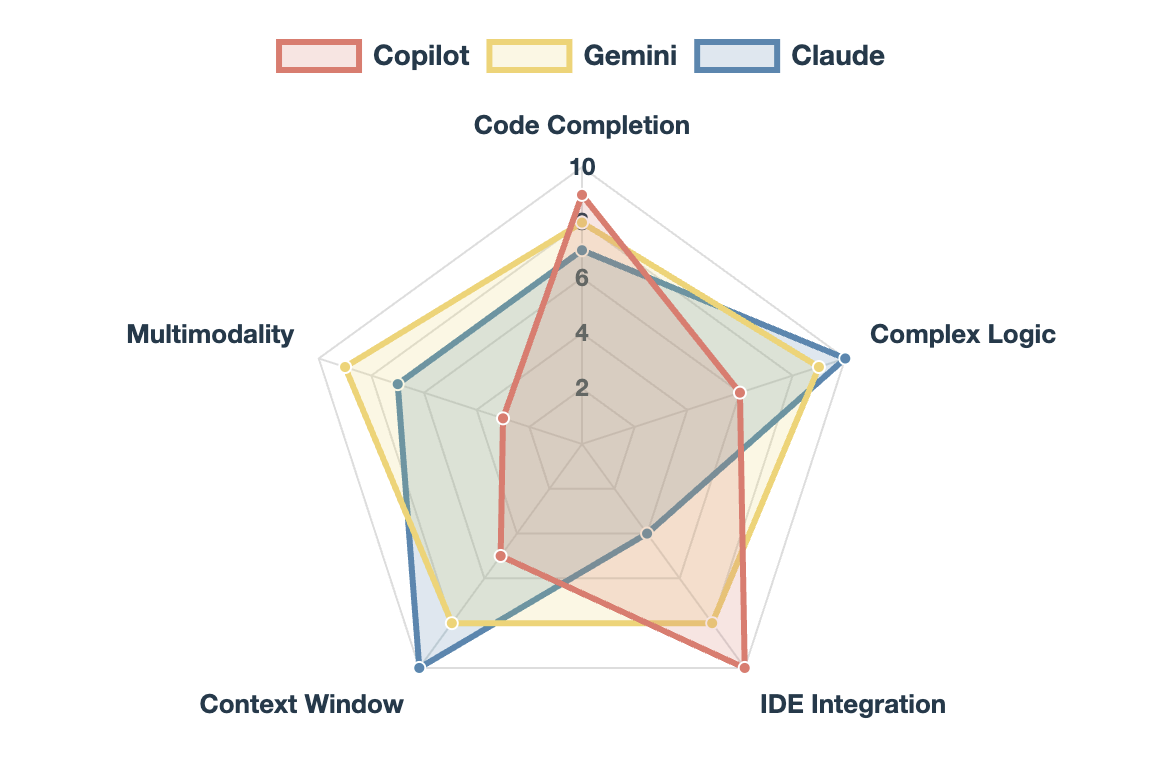
The answer to this question will always be: The one that best suits you. However, comparing these three (they are not the only ones; I could have included Deepseek Coder, Qwen, GPT-5, Mamba, etc.) should provide an idea of the strengths of three of the most popular: Microsoft’s Copilot, Google’s Gemini, and Anthropic’s Claude Code.
To put it simply, for programming, I’d give Gemini a 7/10, Claude a 9/10. And while Copilot lags behind, a basic subscription allows you to use different models (including Claude Sonnet 4.5), and its significant advantage is native integration with GitHub.
Final Advice
In a world where machines can write code in seconds, true human value isn’t in speed, but in judgment.
AI can generate thousands of lines, but it doesn’t understand priorities, context, or impact. That remains our part of the job.
Using AI doesn’t make us lesser developers; it compels us to be better professionals. It requires us to think more, plan better, and be more conscious of the decisions we make.
Because ultimately, AI doesn’t replace experience: it amplifies it. But only if there’s someone behind it who knows where they want to go.
Additional Resources
Some of the courses that helped me improve and understand AI in general, as well as how to use it for development:
- ChatGPT Prompt Engineering for Developers
- Generative AI: OpenAI API, DeepSeek, and ChatGPT in Python
- Pair Programming with a Large Language Model
- Claude Code: A Highly Agentic Coding Assistant
As for tools, the most popular and well-known are Cursor, Claude Code, and ZenCode, but I recommend taking a look at Kilo Code. It allows you to use multiple models (including Claude Code) and can be integrated into VSCode for architecture, planning, and execution.
MCP Tools
Currently, LLMs can communicate with other services or even execute tools that allow them to gain additional context and thus provide better responses. The basic ones I would recommend are:
- mcp-read-website-fast (Allows downloading web pages and using them as context)
- context7 (downloads updated documentation on the libraries/frameworks you are using).
- sequentialthinking (A tool that allows LLMs to keep track of their “thoughts” and better decompose complex tasks).