
Optimizing Context and Skills in AI
Stuck in "Vibe Coding"? Discover how to reduce token usage by up to 70% and improve AI precision in large codebases with Model Context Protocol.
The software development landscape has drastically changed. It’s no longer just about writing code faster with intelligent autocomplete; we are entering the era of agent orchestration. However, many developers remain stuck in what we call “Vibe Coding”: launching random prompts and hoping the AI guesses their intent.
If you want to scale your solutions and stop “burning” tokens unnecessarily, it’s crucial to understand that AI requires structure and specific tools to reason accurately.
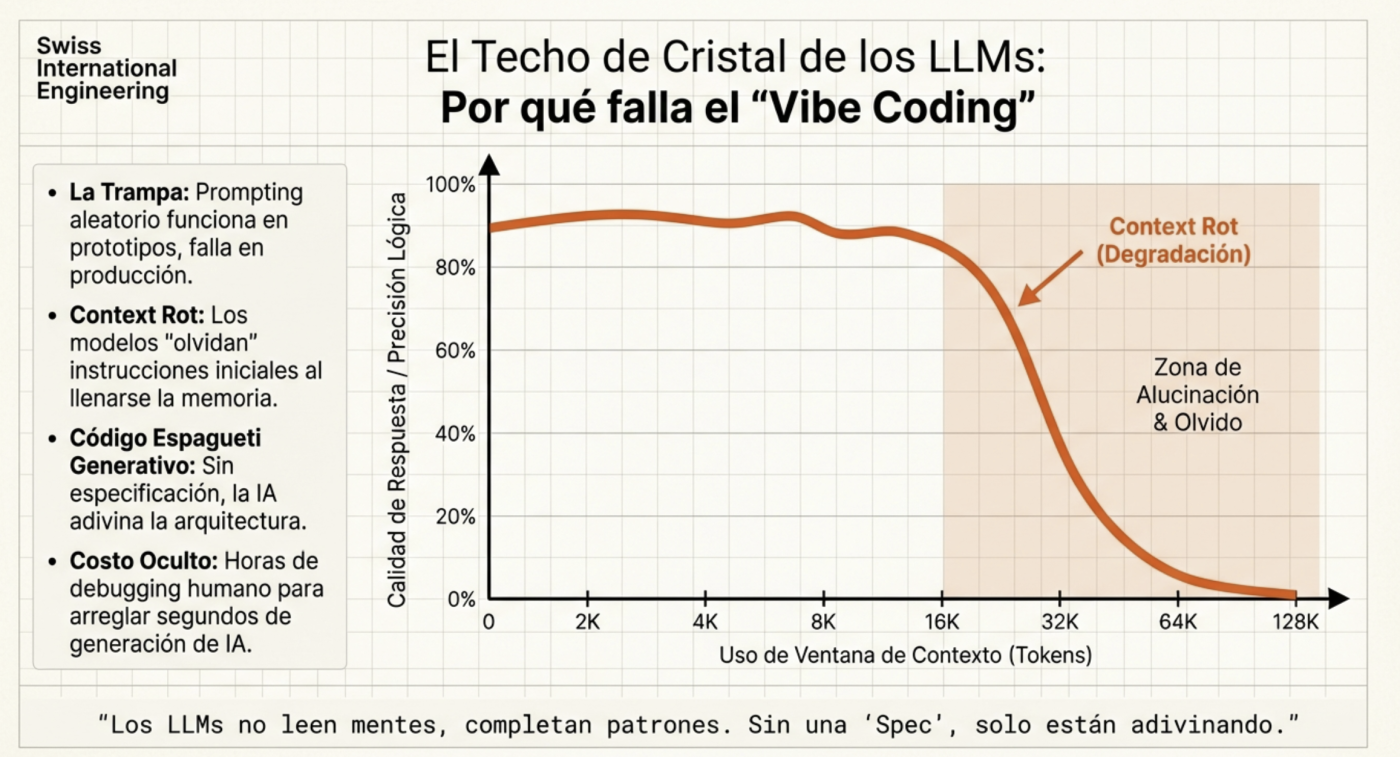
The Ghost in the Machine: “Context Rot” and Token Management
One of the biggest challenges in AI-assisted development is context degradation. As a conversation lengthens, the model tends to lose track of previous decisions, leading to inconsistencies and hallucinations. On average, context begins to lose “connections” at around 60%, which is why it’s ideal to use a tool that shows current context usage (both Claude and Kilocode display this on screen, and Opencode has an extension for the same). Therefore, it’s best to, for example, complete the planning phase, then transfer it to a Markdown file for reference, and finally clear the context (start a new session) to begin execution with a clean context, which is why dedicating significant time to a robust plan is essential. In fact, recent versions of Claude Code automate this process.
To combat this, the key isn’t to provide more information, but better-structured information. This is where tools like the Model Context Protocol (MCP) and semantic retrieval systems make a difference.
Serena: The “Microscope” for Your Code
Many developers make the mistake of attaching entire files to the chat. I’ve done it too, trying to make it “magically” find content it might need at some point. But this is not only costly; it introduces “noise” that confuses the model. Serena is a code agent toolkit (available as an MCP) that equips AI with capabilities similar to those of a professional IDE.
How does Serena work in practice?
Unlike a simple grep, reading a full .ts file, or even using rip-grep (which is a significant improvement over standard grep for developers), Serena utilizes Language Server Protocol (LSP) integrations to allow the agent to “navigate” through code at the symbol level:
- Surgical Search: Instead of reading 500 lines, the agent uses
find_symbolto extract only the definition of a specific class or function. - Relationship Mapping: With
find_referencing_symbols, the agent can understand who is calling a function before modifying it, preventing unintended side effects. - High-Precision Editing: It uses tools like
insert_after_symbolorreplace_symbol_content, which ensures changes respect the language’s syntax and structure without rewriting entire files.
Why is it so helpful?
- Token Savings (up to 70%): By sending only relevant snippets instead of massive files, you drastically reduce your daily quota consumption.
- Hallucination Mitigation: Less noise in the context means the model has “laser focus” on the logic that truly matters.
- Scalability: It’s the only viable way to work in monorepos or large codebases where it’s physically impossible to load the entire context into a single window.
Spec-Driven Development (SDD): The End of Improvisation
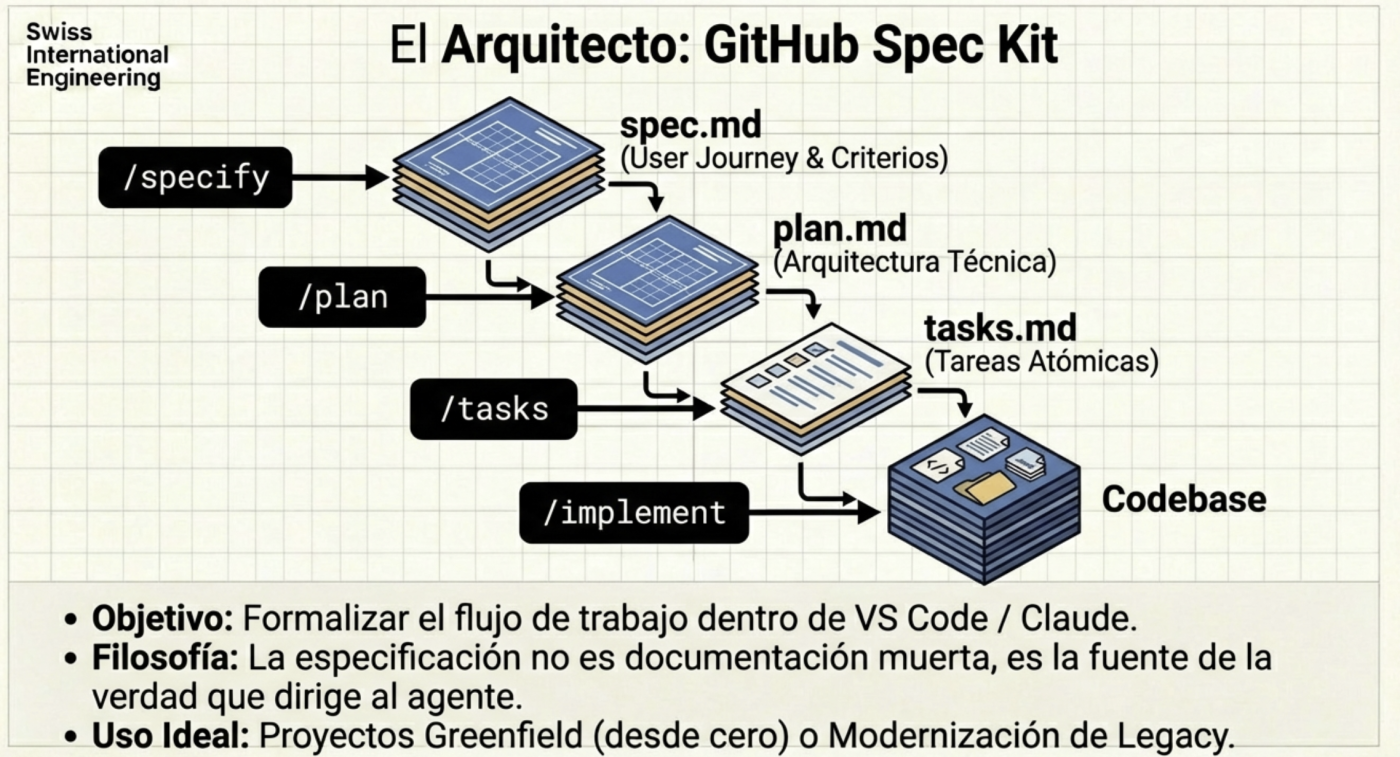
Specification-driven development is not new, but with AI, it becomes mandatory; it’s about re-generating basic software engineering documentation with all the processes and artifacts you likely studied in university. The quality of an agent’s output directly depends on the rigor of the initial specification.
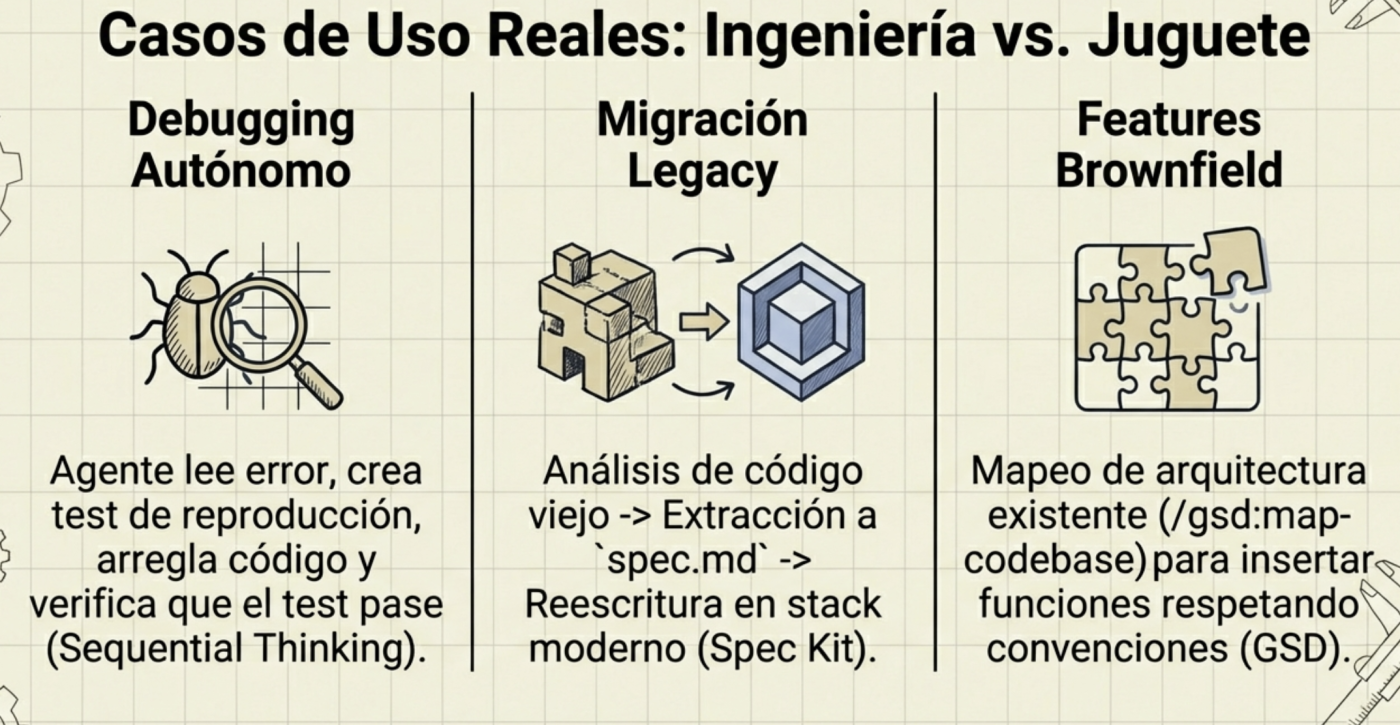
Frameworks like GSD (Get Shit Done) or the GitHub Spec Kit teach us that the first step shouldn’t be writing code, but defining the plan. Both are designed to ask you all the questions, analyze existing components, scope functionalities, etc. You literally have an assistant that conducts initial interviews (only with you in this case) and generates the documents that will then be used to create functionalities, bug fixes, and so on.
The Ideal Workflow:
- Context Engineering: Define the stack, style rules, and base architecture; in the case of GSD, it creates a
planningfolder with highly detailed documentation, much like a standard software plan (Software Engineering 101). - XML Planning: Agents process instructions better when they are structured (e.g.,
<task>,<verify>,<done>tags). - Verification Cycle: Each task must include an automated validation step before being considered complete.
Sequential Thinking: The Cognitive Process
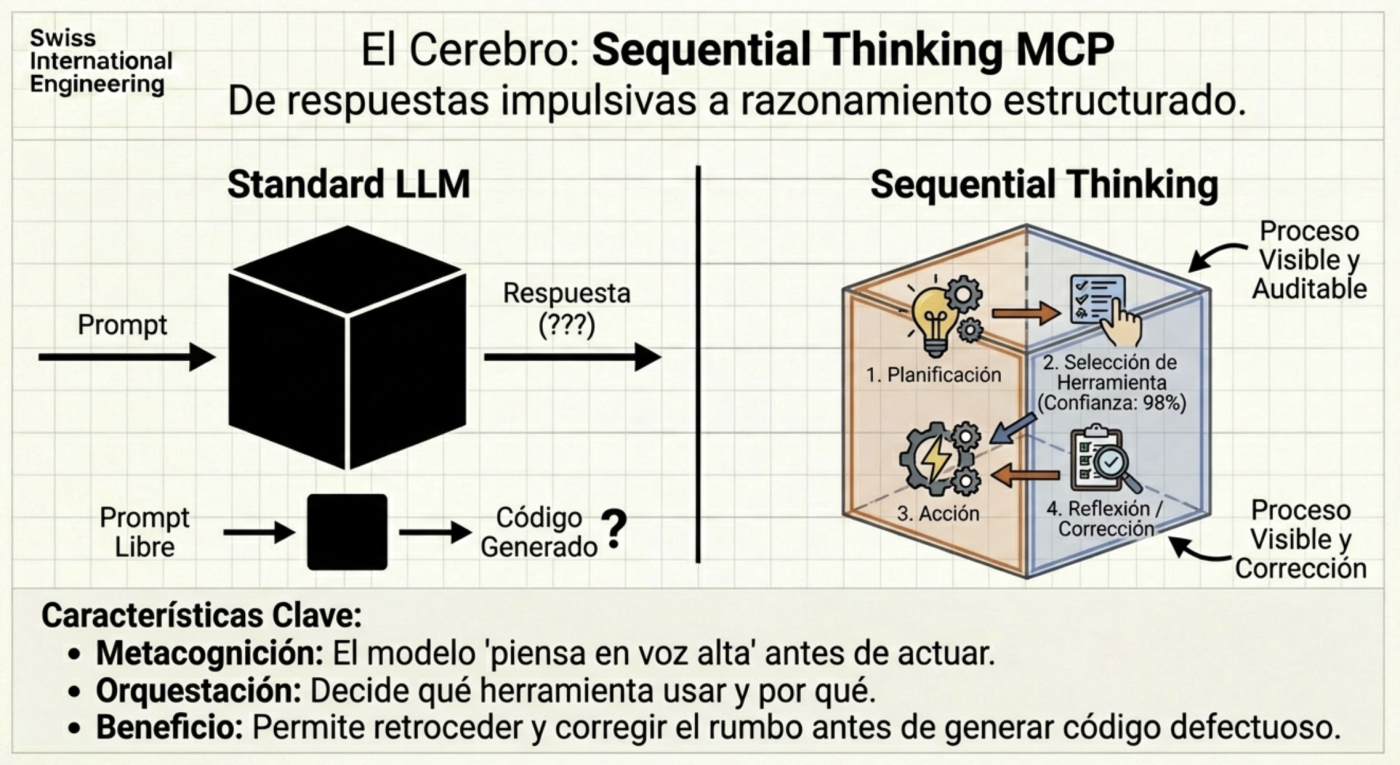
Sometimes, the model attempts to solve complex problems in a single go. Using MCP servers like Sequential Thinking allows AI to “think aloud” and break down the problem into sequential steps. This transforms AI from a generative tool into an agent with critical reasoning capabilities, able to admit when a path is not viable and test an alternative before delivering a failed result.
Use Skills, not MCPs for deterministic tasks
The primary advantage is Massive Token Savings (Progressive Disclosure efficiency). This is the most tangible benefit in terms of both cost and performance.
- The Problem: If you cram all your rules, style guides, and scripts into the “System Prompt,” you saturate the context window immediately. This makes the AI slow and expensive.
- The Solution (Skills): Skills operate under the principle of “Progressive Disclosure.” The AI only loads the Skill’s name and description into memory. Only when you request a related task (e.g., “Review this PR”) does the AI load the heavy instructions for that specific Skill.
- Result: You keep your context clean and avoid “context rot,” which reduces costs and prevents the AI from getting confused by irrelevant instructions.
Determinism vs. Hallucination
Skills allow for deterministic (predictable) actions rather than creative ones.
- Example: Instead of asking the AI to “try to format” a file (which can result in hallucinated syntax), you use a Skill that executes a real script (like Prettier or a linter) or follows a strict template. You can even include templates within the Skill—for instance, a template for generating a new REST endpoint that always follows the same structure.
- Example: A license-header-adder Skill ensures every new file has your company’s exact copyright without you having to remind the AI in every prompt.
Team Standardization (The “Project Expert”)
Skills turn generic models (like Gemini or Claude) into specialists for your specific project.
- Example: You can create a global “Code Review” Skill that forces the AI to verify specific points (security, error handling) before approving anything.
- Example: Unlike “Custom Instructions” that apply globally, Skills are modular and portable. You can share a
.github/skillsor.agent/skillsfolder with your team, and all agents (Copilot, Claude Code, Antigravity) will follow the same standards automatically.
Serena MCP Installation and Configuration Guide
To stop burning tokens and start operating with surgical precision, you need to integrate Serena into your “Neural Link” (your development environment). Here are the exact steps to configure this MCP in the most popular clients.
0. Prerequisites
Before you begin, ensure you have the following installed:
- Python (3.10+).
- An MCP-compatible client (Claude, Cursor, Open Code, or Windsurf).
1. Prerequisites
The best way is to use it via uvx, which automatically downloads and executes the latest version:
If you use Mac or Linux, you can use Homebrew:
brew install uvIf you are on another platform and haven’t used uv before, I recommend checking its docs
2. Configuration by Client
Cursor / VS Code (MCP Extensions)
I recommend installing it manually by opening your global configuration file and pasting the following into the MCPs section:
{
  "servers": {
    "oraios/serena": {
      "type": "stdio",
      "command": "uvx",
      "args": [
        "--from",
        "git+https://github.com/oraios/serena",
        "serena",
        "start-mcp-server",
        "--context",
        "ide",
        "--project",
        "${workspaceFolder}"
      ]
    }
  },
  "inputs": []
}
Claude Code (Terminal)
If you are already using the Anthropic CLI, integration is immediate:
claude mcp add serena -- uvx --from git+https://github.com/oraios/serena serena start-mcp-server --context ide-assistant --project $(pwd)OpenCode / Gemini (Terminal)
{
  "mcp": {
    "serena": {
      "type": "local",
      "command": [
        "uvx",
        "--from",
        "git+https://github.com/oraios/serena",
        "serena",
        "start-mcp-server",
        "--context=ide",
        "--project-from-cwd"
      ]
    }
  }
}
3. Synchronization Verification
Once configured, restart your client and test if the agent recognizes its new “skills”. Run this prompt in a real project:
“Use Serena to find the definition of the symbol [YourClassName] and tell me who references it in the project.”
If you see the agent using tools like find_symbol or find_referencing_symbols instead of reading the entire file, you are synchronized.
4. Tips
- Avoid Noise: You don’t need 20 active MCP servers. Keep Serena as your primary tool for code navigation and only activate others (like Google Calendar or Slack) when the task requires it. Currently, I only keep 2 MCPs consistently active, Serena and SequentialThinking; the rest have been moved to Skills.
- Lazy Loading: Remember that Serena shines in large projects. If you’re working on a 3-file project, the difference will be minimal, but in a monorepo, Serena is what will allow you to keep operating when others run out of token quota.
- Common Issues: If Serena can’t find a symbol, it might be an LSP indexing issue. Don’t force the agent; sometimes a simple
lsorcatmanually helps reorient the context.
Final Thoughts
To leverage AI, we must act as technical leaders, where our responsibility is to maintain technical honesty. We must know when an agent has reached its limits and when our manual intervention is indispensable. Mastering the agent orchestration stack is what will differentiate programmers from software engineers in the coming years.
Have you tried using an MCP server like Serena to “clean up” your context, or do you still rely on AI to understand your “vibes” with thousand-line files?