How I Work with AI Agents (A Practical Guide to Context and Memory)
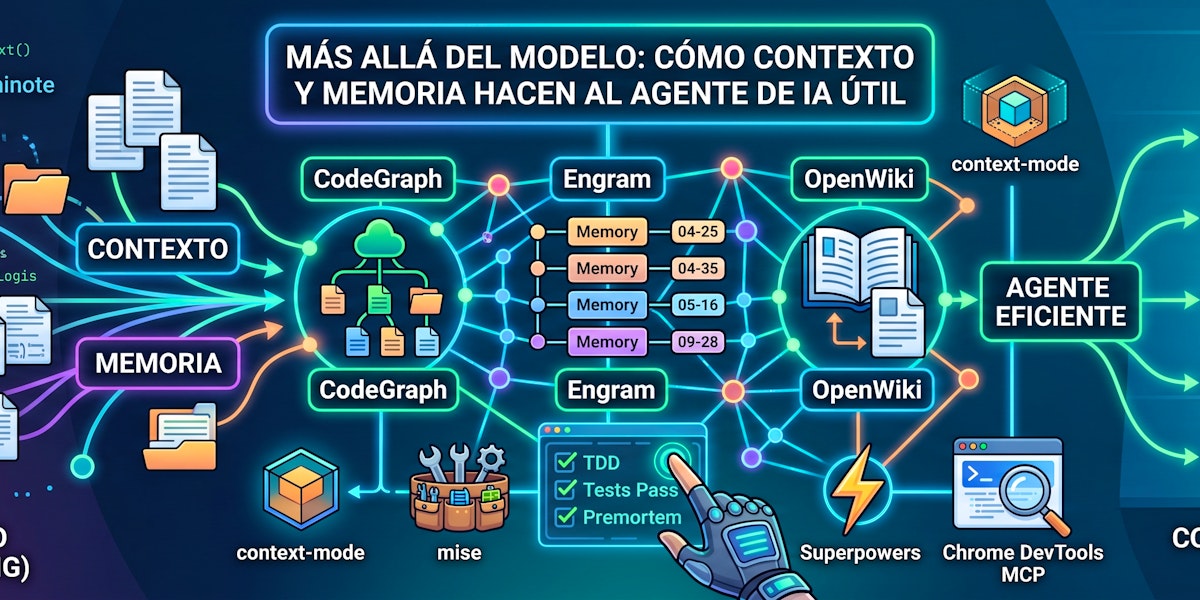
What separates an agent that saves you hours from one that wastes them is not the underlying model, but the context you provide and the memory it retains of what you two have already decided. A practical tour of the memory and context management tools I use daily on every project: mise, Engram, context-mode, and CodeGraph.
The deeper I delve into the universe of AI programming tools, the more I keep finding models, benchmarks, “reasoning,” and all kinds of marketing and wishful thinking. But first and foremost, I’ve found that what truly separates an agent that saves you hours from one that wastes them is not the underlying model (though it helps), but the context you provide (along with the memory it retains of what was decided beforehand). Most reviews and tool guides overlook this part. I’m sharing this from my professional experience, with the tools I currently use day-to-day.
For me, it’s easier to think of an AI agent as a fast, capable colleague who has just arrived and hasn’t yet seen your codebase. You wouldn’t hand such a person a ticket and expect them to resolve it blindly. You’d ask them to sit down, show them the project, explain what was decided last week and why, and only then would you let them work. The whole game with these tools is to achieve that behavior, systematically, with context management and memory instead of hope. Thinking about my personal experience, onboarding, depending on project complexity, could take anywhere from 2 weeks to 3 months (I’ve lived it firsthand). So, how can we properly onboard an AI?
Context First, Code Second
Right now, the most common pitfall I see is people asking an agent to “fix this” without providing any further information. This is almost never the agent’s fault; it’s ours. We want an intelligent partner, yet we treat it like a search box. So, I make it first read the project, the language, the framework, existing conventions, and adapt to what’s truly there, rather than imposing some preferred stack it learned from its training data. I tell it the same thing I’d tell a new engineer: don’t rediscover the codebase in every session; synchronize with the documentation and what’s already been decided, because an agent that guesses your architecture is exactly as dangerous as an engineer who guesses it.
For the structural part of that context, I rely on CodeGraph, which builds a knowledge graph of every symbol, edge, and file in the workspace, analyzed with tree-sitter, and answers questions that grep cannot, like “who calls this?” or “what would break if I change that?”, in sub-milliseconds (npmjs.com/package/@colbymchenry/codegraph). I use it for structure and leave grep for literal text. It transforms context that the agent would have to build by reading entire files into context that’s already readily available.
What it fundamentally does is maintain a local index of functions, calls, and general structure, making searches immediate rather than an eternal cycle of grep + find. Many similar projects exist, but this one has a fairly large and stable community.
Memory is the Part Nobody Talks About
Any model forgets everything it did as soon as the session ends. For this, I use two tools: shared memory and “living” documentation with OpenWiki (which I’ll explain later). In my case, I ended up treating persistent memory as the true asset, and there are two layers I deliberately keep separate. There’s private memory, which is like the notes the agent keeps to itself about your decisions, bugs, and conventions, stored per project so that working on one repo never brings up decisions from another. And then there’s the repository’s own documentation, the wiki that lives in the codebase and which the next person, or the next session, reads as the source of truth. The difference is that private memory is what the next session remembers, and the wiki is what the next person reads, and you need both, not just one.
For the private layer, I use Engram, a local store in SQLite + FTS5 that survives across sessions and even context compaction. You store typed observations, and it flags a conflict instead of silently overwriting when new memory contradicts old, so you end up with a conversation that carries its own history instead of a stateless chat that starts from scratch every Monday (github.com/Gentleman-Programming/engram). I use it proactively, not when asked: context at the start of the session, a search before beginning anything that might have been touched before, a save immediately after any decision or convention change, and a summary before closing. It sounds like overhead until you realize the alternative is rediscovering, and redeciding, the same thing every week.
What does this generate?
When you return to working on the project, instead of re-explaining what you did in previous sessions, you have a searchable history with decisions, adjustments, and explanations that the agent can easily find. It has even happened that I ask for a change and the agent can respond, “Are you sure? That goes against what we did two weeks ago,” even reminding me what I delivered.
The Repo Wiki is Public Memory
And this is where the second layer I was talking about comes in. Because if Engram is what the agent remembers privately, OpenWiki is what the repo stores publicly—its own wiki that lives within the codebase, again under openwiki/, and which the next person, or the next session, reads as the source of truth for the project’s current state. Not a changelog nobody reads, but the real documentation, rooted in the files, the git history, and the decisions already made. The official tool integrates with GitHub and can be triggered after a merge; however, if you want to do it manually (it also works very well), there is a plugin for Claude Code (easily adaptable as a skill to any other agent that fulfills the same function).
The integration into my workflow is a single rule: after any change that affects architecture, a convention, or a workflow, I run /openwiki:wiki update before marking the ticket as complete. The good thing is that it’s idempotent; it takes a snapshot of the wiki before and after and only updates what truly changed. So, running it often is cheap, and running it rarely is what makes it expensive. The complete pattern is: Engram is what the next session remembers, OpenWiki is what the next person reads, and you need both, not just one. Following the recommended structure helps the agent find answers much easier. In my case, it has even helped me find obsolete parts of the application, sections that need updating, and it maintains the basic engineering idea that documentation should always be up-to-date.
The Context Window is a Budget, Not a Trash Can
This is the part that incredibly reduced token consumption and changed how I work. The naive approach is to dump every log, every diff, every web page into the conversation and let the model swim in it. But I learned to give it tools that process and index that instead, so large output is searched rather than pasted, with a queryable knowledge base. This sounds like an implementation detail, but in practice, it’s the difference between an agent that remains lucid in the second hour and one that drowns in tokens it can no longer reason with.
context-mode is my primary tool here: it executes tool output in a sandbox and indexes it. This way, a huge log or a large diff is processed and searched instead of being directly dumped into the context window, and only the answer you need returns to the conversation (github.com/mksglu/context-mode). It’s one of those tools you don’t notice working until you remove it, and suddenly the agent starts rereading thousand-line files in its window and forgets what it was doing.
Tests Are the Instrument, Not the Formality
And this is where the discipline that gives meaning to all the above comes in. Because an agent with context and memory but without tests is just an agent that sounds confident. So the cycle is red, green, refactor: first, write the failing test for the change, then the minimum code to make it pass, and finally, clean up what’s left. I don’t let the agent bypass this; I train it so that every real ticket runs the complete suite and, above all, that it runs the real command and reads the real output before claiming something works. Because I can promise you a test passed, but if you didn’t run it and didn’t see its output, it’s just an assertion (evidence before assertions).
The Eyes the Agent Needs: Chrome DevTools
And there’s one last piece that almost no one uses when starting out. Because a test suite tells you if the code is logical, not if it looks good in a browser. So, for the question “does this really work in the browser?” rather than “does it compile?”, I gave the agent eyes with Chrome DevTools MCP, which provides a real Chrome it can control: navigate, click, fill forms, take DOM and accessibility tree snapshots, review the network and console, run performance traces, and even Lighthouse audits and screenshots. In practice, it’s the difference between the agent telling you “the fix compiles” and it telling you “I opened the page, the consent flow looks like this, the console shows no errors, and the LCP dropped two seconds.” And that, along with tests, is what turns a terminal assistant into something you can truly rely on for delivery.
Superpowers: The Process as an Extension
And if the process is where the value lies, the way to not forget it is to let a library of skills, Superpowers—there are other options, like Matt Pocock’s Skills, but at least in my case, Superpowers proved much more practical for my needs—handle the alignment for us. It loads automatically at the start of the session and routes each task to its correct skill (github.com/obra/superpowers). The two I use most are brainstorming and planning: the first forces me, and the agent, to convert a vague idea into an agreed-upon design before a single line of code exists, to discuss requirements and approach instead of assuming them. The second breaks that approved design into a small implementation plan, using TDD where it first defines the failing tests, creates a SPEC, then a plan, and only then do we jump into implementation. So I’m not delegating the “what”; I’m delegating the “how” of a problem we’ve already defined together. What I find important is that it uses the file system in such a way that even if you close the session, you can continue from the files with a HANDOFF, which can later be transformed into documentation within OpenWiki.
Premortem: The Skill That the Ticket Demands
And to that process, I added one more skill that doesn’t belong to Superpowers but installs itself, because it’s the mandatory gateway before any completed ticket returns: the premortem. This is where you assume the change has already failed in production and you’re working backward, looking for failure modes, regressions, and edge cases. You fix what it finds, run it again, and if something is deliberately not fixed, you document it in the delivery (Premortem Skill).
I integrate all of this into my base “system prompt,” it can be CLAUDE.md or AGENTS.md, which is read at startup (globally, not per project), to force the agent to put anything it delivers through the Pre-mortem process. I’m thinking of converting it into a sub-agent so it does it with a clean context, but for now, as a Skill, it has yielded excellent results.
All Progress Is a Process Change, Not a Model Change
The tools that moved me the most aren’t the most ingenious prompts; they are the disciplines surrounding the whole endeavor: brainstorming before touching code, tests with refactor, and above all, a premortem before any completed ticket returns, where you assume the change has already failed in production and you work backward, looking for failure modes, regressions, and edge cases—which is a gate, not a suggestion. And I run the real build and read the real output before I or the agent claim something works, because evidence before assertions.
Why All These Tools Go Through a Runtime Manager
And here’s a detail nobody warns you about: all these tools are from different languages and runtimes glued together—a Go binary for memory, an npm package for the knowledge graph and sandbox, and so on. On the average machine, that means global tools installed with a plain npm install -g land under the Node version that nvm or fnm has active at that moment. As soon as your shell chooses another Node, in another terminal, in another repo inside another project, that path falls out of your PATH, and the tool silently disappears.
So, I manage them with mise, which sets an explicit runtime for global tools and owns their shims outside the bin directories per version manager, thus keeping the path stable instead of depending on the week’s fad in your .nvmrc (mise.jdx.dev). The rule I keep in mind maps exactly to the tools on this list: mise for anything that’s a language package with a CLI entry point, and a single owner per binary, because two package managers updating the same tool on different schedules will always end up fighting.
Perhaps I’m not the best at this, but after two years working with these agents on real projects, this is what I’ve settled on. The honest summary is: we must treat the agent like the colleague it could be, give it context, maintain its memory, and apply the same disciplines you would apply to a person. Because the model is cheap; context is what we control, and the difference between a tool that impresses you in a demo and one that delivers the work is, in every case I’ve seen, whether you took the effort to manage context and memory.